
Jobs, Stages and Tasks

 Our spark application is going to be a mixture of actions and transformation. Jobs, stages and tasks are interdependent entities that are result of the execution of our program


Jobs:


Based on the number of actions that we specify the Driver converts our program to one or more Jobs. Each Job will consist of one or more Stages.


Stages:


Stages are created based on what operations can be performed serially or parallelly. Stages are a group of tasks. Spark tries  to group as many tasks as possible. Each stage can have a dependency on another stage. The Stages and their dependencies are represented as Directed-Acyclic-Graphs (DAGs).


Stages are separated when there is need for shuffling (which will be covered in another article) to perform the next transformation. So we can say the number of stages in a job depends directly on the number of shuffle operations that need to take place. What does this mean in the context of the above diagram is that between the every two stages shuffling happens. The arrow that separates is not just to connect the stages but also representation that shuffling is taking place.


When there are dependencies between stages, it means that they have to be sequentially executed. Stages can also not have dependencies, in that case the stages are executed parallelly. 


Tasks:


As mentioned earlier, each stage in Spark consists of tasks. Task is the smallest unit of work in Spark. Each task works on a single partition on one of the Executor’s cores. As mentioned in one of the previous articles, multiple partitions can be assigned to a single core. So if there are 500 partitions, we will have 500 tasks that can be executed in parallel.


Pipelining:


Pipelining is one of the optimizations that Spark does. As mentioned above Spark tries to group as many as tasks within a Stage, which do not need shuffle to happen(Narrow Transformations). This grouping is possible when there is no need for shuffling between operations. So for example, let’s say I have the following table:
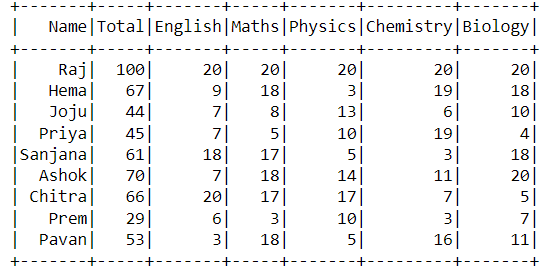


Now I want to see the records of students who have scored total marks less than fifty, so I apply:

df1 = df.where(df.Total < 50)

Then I decide to know which students who have failed in English within the results of the previous filtering(Total<50):

df2 = df1.select('Name').where(df1.English < 10)

So now when I try to do a show on df2, there will be one single stage within which Spark will group together two different transformations and perform both within one stage. This is called pipelining.

Conclusion:

This article should have given you the basic idea about jobs, stages, tasks and pipelining. If you have any suggestions or questions please post it in the comment box. This article, very much like every article in this blog, will be updated based on comments and as I find better ways of explaining things. So kindly bookmark this page and checkout whenever you need some

reference. 


Happy Learning! 😀


Comments

Popular posts from this blog

Rows in Spark 101

  Every row in a Dataframe is of type Row and this object comes with many methods with which we can interact with the data that it consists of. In this article I will dive deeper into the Row object Row: The objects of Row class can hold multiple values that correspond to columns. We can create Row objects separately or access Row objects from the existing dataframe. The Row class can be imported as follows: from pyspark.sql import Row  There are several methods that can help retrieve row objects from the dataframe. Some of them are listed below: df.collect() : This method returns a list of all rows that are present in the dataframe. The result is returned to the driver, so we should be careful while running this method as the driver might not have sufficient memory to hold all the Row objects.  df.take(num) : This method returns a list of a specific number of records, specified by the argument num that we are allowed to pass. The results are returned to the driver, so ...

Introduction to Structured Streaming

  Structured Streaming is one of the APIs provided by Spark to address stream processing needs. The API is based on the familiar Structured APIs, so the data are treated as tables with only one important distinction which is that it is a table to which data is continuously appended. As seen in the previous article, because of the base, which is the Structured API, we can perform SQL queries over our data. So the amount of technical capability required to construct operations on data is low. Much of the complexity that revolves around the stream processing is abstracted and we are left with configuring and expressing operations at a high level. But still there are concepts of Structured Streaming that one has to be familiar with before starting to work with it. In this article, I would like to provide a basic description of the landscape which will further be explored in the coming articles. To ones who are familiar with Structured APIs and its concepts, there are not many new conce...

Spark Streaming APIs

  Streaming applications and some common designs of such applications had been discussed in the last two articles: article1 and article2. Spark, which is a powerful processing engine for batch data, also provides support for streaming data. The support comes as two related streaming APIs.  The earliest stream processing API in Spark is called DStream API and it takes the micro-batch processing approach over the record-by-record processing. The second design pattern that the DStream API follows is that it takes the declarative programming approach rather than the imperative approach. Finally the Dstream API only supports processing-time processing. For event-time use-cases, we have to implement our own version depending upon the use-case. One important distinction of DStream API is that it works on Java or Python objects instead of the familiar table-like abstractions such as Dataframe or Dataset. Since the objects are tied to their language, the amount of optimizations that Sp...